
What You'll Get in This Blog
Door access control is what decides who gets into your gym. A member shows their face or fingerprint, the door checks their membership, and it either opens or stays shut. When it works, nobody notices. When it stops, your front desk notices first, and so do your members.
Most door access control problems are not about the door at all. They come from the chain of PCs, software and networks between the door device and your membership system. This article explains where that chain breaks, and how Workzish Cloud Gateway removes it.
What is door access control for a gym?
Door access control is a system that lets the right people through a door and keeps everyone else out. In a gym, the right people are members with an active membership.
A biometric device at the door, using face, fingerprint or palm recognition, identifies the member. The software behind it then checks the membership. Active members get in. Members with an expired membership or unpaid dues can be stopped at the door, and every entry is recorded as attendance.
Because the door and the membership live in the same system, there is no separate list to keep up to date at the front desk. For the full feature set, see our gym access control system page.
How door access control usually works
The devices at the door do not talk to your membership software by themselves. Traditionally there is a chain between them:
- Biometric devices on the same local network as the front desk
- A dedicated reception PC that stays switched on
- Device software such as ZKTeco BioTime installed on that PC
- Middleware that passes the data on to the cloud
This was how Workzish door access control worked too. Our own middleware, the Workzish Gatekeeper, sat on that PC next to BioTime and relayed everything to Workzish.
Where door access control breaks
Every link in that chain is something that can fail, and when one does, door access control can stop syncing. The usual causes:
- The reception PC is switched off or restarted
- The local network goes down
- The middleware stops running
- A device firmware update changes how the device communicates
The last one is what pushed us to change the design. When the firmware on ZKTeco devices was upgraded, our Gatekeeper had to be rewritten. The real difficulty was BioTime: our link to the devices depended on it, and we struggled to keep communication dependable. Patching around a layer we do not control would have left every facility with the same weak point.
The solution: Workzish Cloud Gateway
So we removed the chain. We designed our own device gateway that supports ADMS, the way ZKTeco devices push their data to a server, and called it Workzish Cloud Gateway.
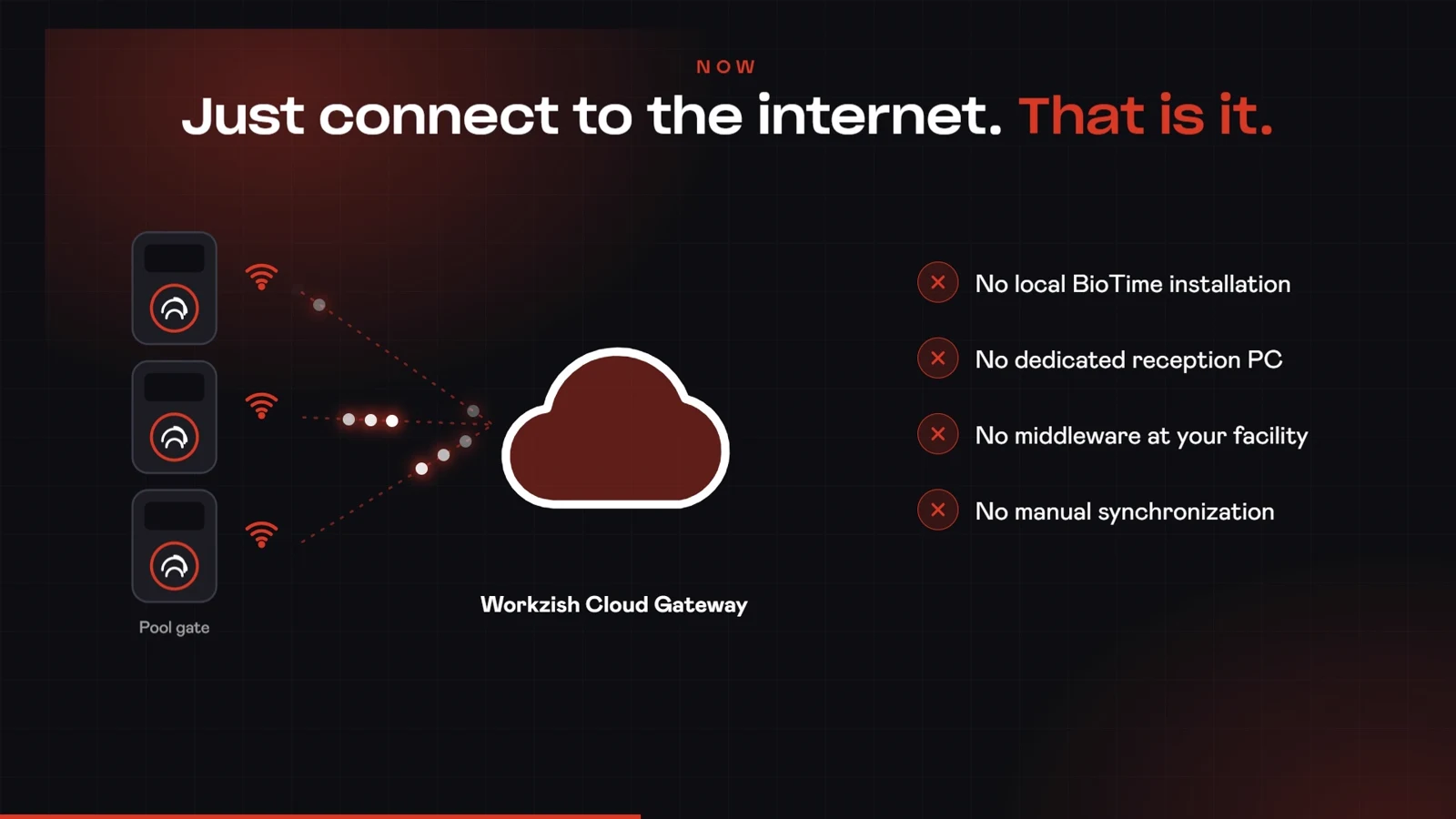
Each biometric device connects to the internet and talks to the Cloud Gateway. The gateway takes care of synchronization with Workzish: members, attendance and access events. There is nothing in between.
All a device needs is power and a stable internet connection, over Wi-Fi or a LAN cable. It does not matter whether your devices sit on the same network or on different ones.
What you no longer need
- No local BioTime installation
- No dedicated reception PC
- No middleware running at your facility
- No manual synchronization
Everything happens through the cloud.
Know the moment a door device goes offline
Because every device talks to the gateway directly, Workzish always knows whether it is connected. You can see the live status of every door device from your phone or your desktop.
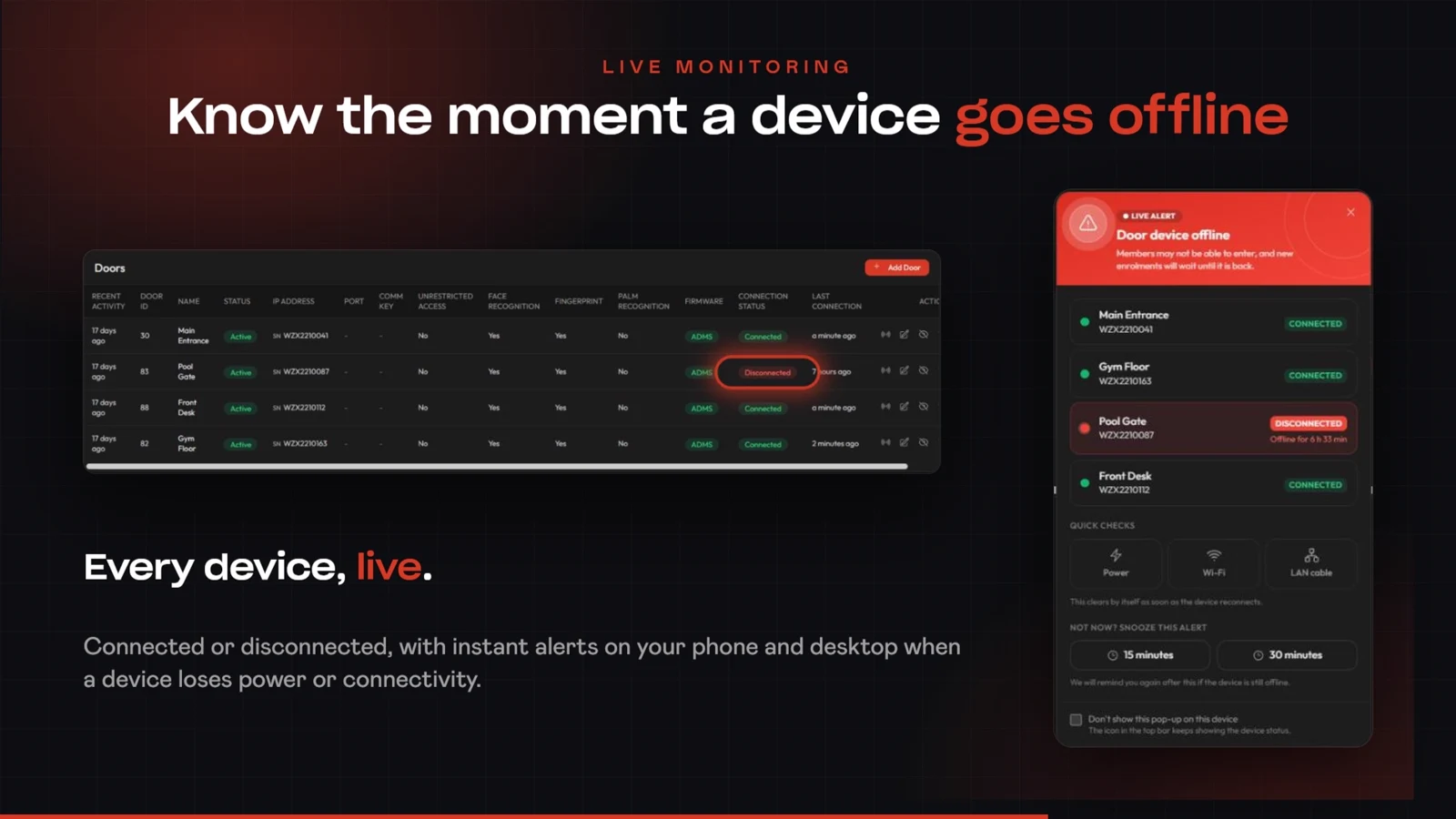
When a device loses connectivity or power, Workzish raises a Door device offline alert. It lists every device, marks the one that is disconnected and shows how long it has been offline. It also suggests the three quick checks that fix most cases: power, Wi-Fi and the LAN cable. The alert clears by itself as soon as the device reconnects, and you can snooze it for 15 or 30 minutes if you are already on it.
Your team finds out in minutes, not when a member complains at the door.
What to look for in door access control
Whether you use Workzish or compare other options, these are the questions that matter:
- Does the door follow your memberships, so expired or unpaid members are stopped automatically?
- Does it support the recognition you need: face, fingerprint or palm?
- Does it depend on a local PC or server that has to stay on?
- Can you see which devices are online or offline, live?
- Are you alerted when a device goes offline, or do you find out from members?
- Does it work across branches and networks without extra setup?
- Is attendance recorded automatically from the door?
Built for a real gym
Workzish Cloud Gateway was born at The Muscle Town, a Workzish customer whose devices needed it. We developed it, deployed it, and it worked. You can read how that went in the story of The Muscle Town.
Questions we get asked
What is door access control in a gym?
A system that identifies members at the door, checks their membership and opens the door only for those who are allowed in, while recording attendance.
Do I need a PC or any software at my facility?
No. There is nothing to install on a reception PC. Your devices need power and an internet connection.
Do the devices have to be on the same network?
No. They can be on the same network or on different networks, as long as each one has internet through Wi-Fi or a LAN cable.
Which devices does it work with?
Devices that support ADMS. This is the case for the ZKTeco devices Workzish customers use today. Ask our team and we will confirm your model.
What happens when a door device goes offline?
Workzish shows it as disconnected, tells you how long it has been offline and raises an alert so you can act straight away.
Take the PC out of your door access control
Book a free demo and see Workzish Cloud Gateway with your own setup.
Book Your Free Demo